If your solar system appears to have stopped producing or shows an error, a proper power cycle can often restore it.
Follow this exact sequence to safely reset your SolarEdge inverter and give it the best chance of recovering.
⚠️ Before You Start
- Do not open the inverter
- Do not touch wiring
- Follow the steps in order — this is critical
Step 1: Toggle the Inverter OFF (Start Here)
👉 Locate the ON/OFF toggle switch on your inverter. Between the upper and lower cabinet by the flashing LED lights.
Action: Flip the switch to OFF (0 position)
⏱️ WAIT — 1 Full Minute This Step Is Critical
Wait a full 1 minute
This allows the internal DC capacitors to discharge safely.
👉 Don’t rush this — set a timer on your phone if needed.
Step 2: Turn OFF the DC Disconnect
This is the ROUND DIAL on the lower cabinet of the inverter.
👉 This stops power coming from your solar panels.
Action: Turn the dial of the DC switch to OFF
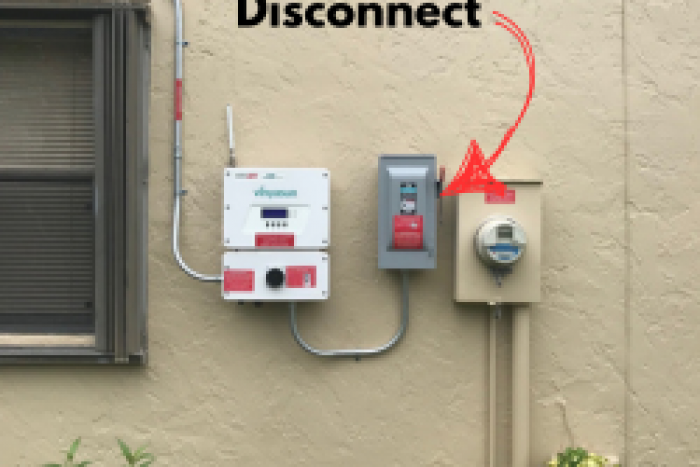
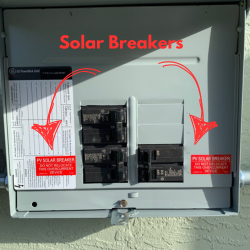
Step 3: Turn OFF the AC Disconnect or Breaker
👉 This disconnects your inverter from your home and the grid.
Action: Use the handle on the AC disconnect to set to OFF position
If no AC Disconnect is present find the breaker and set it to OFF.
Look for labels like:
- “PV System”
- “Solar Disconnect”
- “Inverter”
Step 4: Wait 2–3 Minutes
Now let the system fully power down.
This allows:
- Internal electronics to reset
- Communication boards to clear faults
👉 Give it at least 2–3 minutes
Step 5: Turn Everything Back ON (Reverse Order)
Now we bring the system back online.
Turn ON in this exact order:
- AC Disconnect / Breaker → ON
- DC Disconnect → ON
- Inverter Toggle Switch → ON
Step 6: What to Expect During Startup
Once everything is back on:
👉 Set a timer on your phone for 5 full minutes
The inverter needs time to reconnect and stabilize.
You’ll typically notice:
- Audible relay sounds:
“click… click… clickity… click” - Lights turning on:
- ✅ Green light (production)
- 🔵 Blue light (communication)
This means:
- The inverter is syncing with the grid
- The communication board has reset
- The system is coming back online
- You should see the production on your MySolarEdge app within a few hours in addition the inverter will upload any stored days of data that you missed up to 30-days.
If It Works — You’re Good
Within a few minutes, your system should return to production.
If It Doesn’t Work
If you don’t see:
- Green/blue lights
- Production after ~10–15 minutes
Then you’re likely dealing with:
- Inverter fault
- Communication failure
- Optimizer or panel issue
- Grid/voltage problem
At that point, it’s time for deeper diagnostics – and you’ll need to schedule a solar service, repair and maintenance visit.